Optimizing Links for QR Codes
QR Codes are a well-supported enough way to transfer someone onto a website on their phone.
But how do you make QR codes that don’t require a large surface area to scan correctly? (The answer probably won’t surprise too much)
Once I saw a QR code that looked something like this:
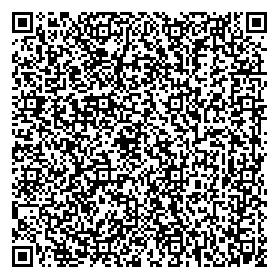
I saw this in a magazine, printed at a size of about 1 or 1.5 cm side-by-side. This naturally did not scan.
But of course, if you look at the actual URL it leads to you might notice a couple of problems very immediately:
https://www.this-is-a-long-site-name.example/index.php?page=sections/about-6/getting-started-67/lorem-ipsum-dolor-sit-amet-621&utm_source=big-weekly-newspaper-magazine-week-4-july-twenty-twenty-six&utm_medium=qrcode&utm_campaign=big-weekly-newspaper-magazine-placement
- copious amount of tracking parameters
- Extraneous parts from whatever is doing the request routing (integer IDs in slugs,
index.php?page=routing, etc) - www. prefix
- the chosen domain name is quite long. This could be the least actionable part of it is probably what others already know about
Now consider this one instead:
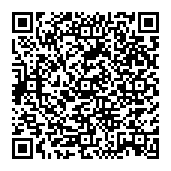
Much better, isn’t it?
That got me wondering, what is the smallest you could reasonably turn the QR codes for your website?
The Devlog
We have started work on a replacement for the backend that runs this site.
Currently the stack is very simply just Hexo Static Site Generator with a mildly cursed deployment script that copies the HTML files to an S3-compatible bucket which is served through a CDN.
This makes the site very fast and reliable, but also only offer limited interactivity (comments, etc).
As part of the rewrite we wanted to make it easy to share links to it via various methods, and so the link was the first thing addressed.
Currently, the permalinks here are a somewhat haphazard /year/month/day/Slugified-and-case-sensitive-title-with-%E2%80%9Cunicode%E2%80%9D which while kind of an obvious solution does lead to monster links like https://lotte.chir.rs/2024/08/18/Missing-Salamanders-Matrix-Media-can-be-decrypted-to-multiple-valid-plaintexts-using-different-keys/
As an aside, this post is actually the first one to use the new permalink style /year/week/manually-set-slug. The other ones will be migrated to this in the future, with redirects ofc.
Some Basics
(section mostly stolen from wikipedia)
QR Codes come in various variants and colloquially refer to any type of 2D Barcode.
Only the standard full-sized rectangular QR code is widely supported in consumer devices, however.
QR Codes also come in various sizes, which it calls “Versions”, which range from 1-40.
The black and white dots in them are referred to as “Modules”. A version 1 QR code is a 21x21 square module, each additional version adding 4 more modules in either direction.
They also require a white border around them, without which the code becomes unreadable in many readers.
QR Codes also have error correction, meaning that a reader can recover from the QR code being partially obscured or damaged.
At the highest up to 30% of the encoded data bytes can be damaged or obscured before the QR code stops working.
There’s also several different data encodings it can use
- Numeric
- Alphanumeric
- Bytes (practically UTF-8)
- Kanji
The primary one I found used in the wild is the bytes one, mostly because it’s the most versatile, but the other ones are more efficient at their job.
The standard encoding
If we just throw the aforementioned article permanlink at qrencode, we get the following image out:
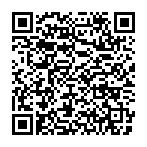
This is actually smaller than the previous QR code, but that is because the library defaults to the lowest error correcting mode by default, L.
If we bump it up to the H error correcting mode[1], as before, we get:
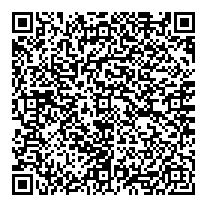
Given a big enough area to display it on, these are fine, but we can definitely get shorter!
Investigating the other encoding modes
Kanji
The Kanji mode can only encode specific Shift-JIS ranges, which namely excludes all ASCII characters. Besides, it would take 13 bits per character to encode, making it not useful for URL encoding
Numeric
As the name implies, it can encode decimal numbers and nothing else. Good for if your URLs are actually european article EAN numbers.
Alphanumeric
The name also makes it sound not particularly fitting until you look at the character set it supports:
0-9A-Z(upper-case-only)- (space)
$,%,*,+,-(meh).,/,:(holy shit!)
The alphanumeric charset has enough characters to encode many simple case insensitive or uppercase URLs. If we pretend for a second the old permalinks were case insensitive:
Size limits
My personal goal is to fit the links inside a Version 1 or 2 QR code, so let’s look up how many characters we can fit in each QR code on the QR Code website:
| Version | ECC Level | Alphanumeric | 8-Bit |
|---|---|---|---|
| 1 | L | 25 | 17 |
H | 10 | 7 | |
| 2 | L | 47 | 32 |
H | 20 | 14 |
Practically, the shortest you can reasonably make an URL is 15 characters[2] (e.g. https://chir.rs), 16 if you wish to add a path.
As such we can disqualify any cell below 20 immediately.
URL Shorteners
I often bemoan these, but it’s mainly because of public url shorteners that do nothing but obscure the target and track you, but I think they can be useful if they only point at local pages.
Specifically:
- It allows for smaller, more compact, QR codes (where you already can’t tell at a glance where the QR code leads to exactly)
- Certain platforms limit the length of messages, and URLs count towards that.[3]
With the levels above are 3 potentially useful combinations
- Version 1 ECC Level L (9 alphanumeric character IDs)
- Version 2 ECC Level H (4 alphanumeric character IDs)
- Version 2 ECC Level L (16 byte IDs)
Let’s look at the most restrictive of these first.
ID Number Base
Base32
The most obvious one to use, I think. It consists of only digits and uppercase letters (and padding which imo is a worse Idea than the base* bases in the first place)
Since each digit represents 5 bits, 4 characters represents 20 bits, so about 1 million IDs
Base36
Computers have been able to multiply and divide decently quickly for quite some time now[citation needed], and as such it is totally feasible to encode numbers in non power-of-two bases.
The next one up is Base36, which is all 10 digits, plus all 26 letters of the latin alphabet. is about 1.6 million.
Base43 — What is the theoretical maximum?
If we look again at the alphanumeric encoding, what are the characters that are permitted in the path position of an URL?
0-9andA-Zare trivially supported (base36)- space always requires percent-encoding. not useful.
$,*,+,-: No special purpose in URLs, usable as is%: URL escape character. Not usable.:: Used to separate the protocol from the rest of the URL, or the port from the host. No special use in the path segment, can be directly used..: . and .. are used for relative paths in URLs, path components that consist of . or .. will get pieces removed by the client. Only partially usable/: Used as a path component separator. However consider the ABNF of URIs: a path component can be empty, and unlike dot part removal, clients shouldn’t remove multiple slashes in a row.
Base41 would give us IDs, or 3.4 million.
Base42
In practice however, the combination of . and / is quite problematic. Consider the link https://example.com//../. The browser is going to send a request to https://example.com/.
So we would need to remove one of the two to make this scheme actually work.
Out of the two to remove, I pick ., since the . and the .. problem exists for shorter encoded strings.
This leaves us with IDs, or 3.1 million.
Using shorter IDs
Until now we have only looked at exactly 4 character IDs. However shorter URLs are both valid and distinct, so it’s possible to use those too
As such it would be possible to remove leading zeros. This doesn’t actually extend how many distinct IDs however, since leading zero digits do not contribute anything to the number.
Bijective Bases
Bijective number bases do not have a digit for 0, instead having a digit equivalent to 10 in the regular base.
As an example, Bijective Base 10 counts from 0 to 11 like this: [empty], 1, 2, 3, 4, 5, 6, 7, 8, 9, A, 11
You can calculate the maximum representable number of base with maximum length as such:
This does expand the range by about 2%. Nice.
The tantalizing promise of correctness
Unfortunately I am just off the call with multiple different pieces of software that turn plaintext into links automatically, and it turns out they do not like URLs that end in some/any punctuation that is not /. Oops.
Another base trick we can do is mixed numerical bases. The last digit could be Base37 (base36 with /) for example.
This idea can be extended further however, by dynamically changing the numerical base based on what digit comes after.
Here’s the rules I came up with:
- Last digit is /0-9A-Z (base37)
- Any digit that is not followed by / is encoded in base43, otherwise base42.
To see what I mean I made this little calculator (requires javascript):
QR Alphanumeric encoded:
URL Path Segment encoded:
For completeness I have added a second one for path segments in the URL as used in new-style permalinks
The downside of this approach is that it causes some discontinuities in length near the border to 5 letters for example. Try entering 3000035 for example.
Wrapping Up
So where does this leave us?
the https://chir.rs/ shortlink site!
This is the first part of the new website that is deployed. The homepage also now redirects to https://lotte.chir.rs/ as a semi-intentional consequence.
This is the final culmination of these results:

and about 3 million[4] other possible links that are just as long.
Trivia
With the new permalink encoding, the final week of a 53 week year will be encoded as !!.
- 58,125 maps to SEX in the QR ID encoding scheme
- 30,000 maps to ASS (Found by selicre)
- 1.The H error correction level is imo the most appropriate one for print or where there is nobody to fix the QR code (unattended screens). L meanwhile is useful if you just need to share a link with someone in person without any external services. By making the H error correction mode very small, there is also no real need to use lower error correction modes. ↩
- 2.The number of 6 character domains is quite limited and expensive, 5 and 4 character domains is restricted and/or very expensive. Until all browsers ship automatic https redirects, the s in https is also needed. ↩
- 3.The two microblogging platforms I use, akkoma and bluesky, count URL characters towards character limits. I effectively disabled the character limit on akkoma, but the size limit is actually enforced on bluesky. As I understand it, X and Mastodon count URLs to be a single fixed size (X by shortening the link through the generic t.co link shortener) ↩
- 4.$3011800$ is the last id that is 4 characters, it encodes to ZZZZ fittingly enough. ↩